Artificial Intelligence
A No-Code Guide: How Businesses Can Build an AI Automation Assistant Using n8n

·4 min read
Modern businesses spend a significant amount of time on repetitive tasks such as managing emails, scheduling meetings, responding to messages, and organizing data. These tasks, while essential, reduce productivity and limit the ability to focus on strategic work. With the rise of artificial intelligence and no-code tools, it is now possible to automate these processes without building complex systems from scratch. This article demonstrates how businesses can build a powerful AI automation assistant using n8n, integrated with AI APIs, to handle daily operations efficiently.
What You Will Build?
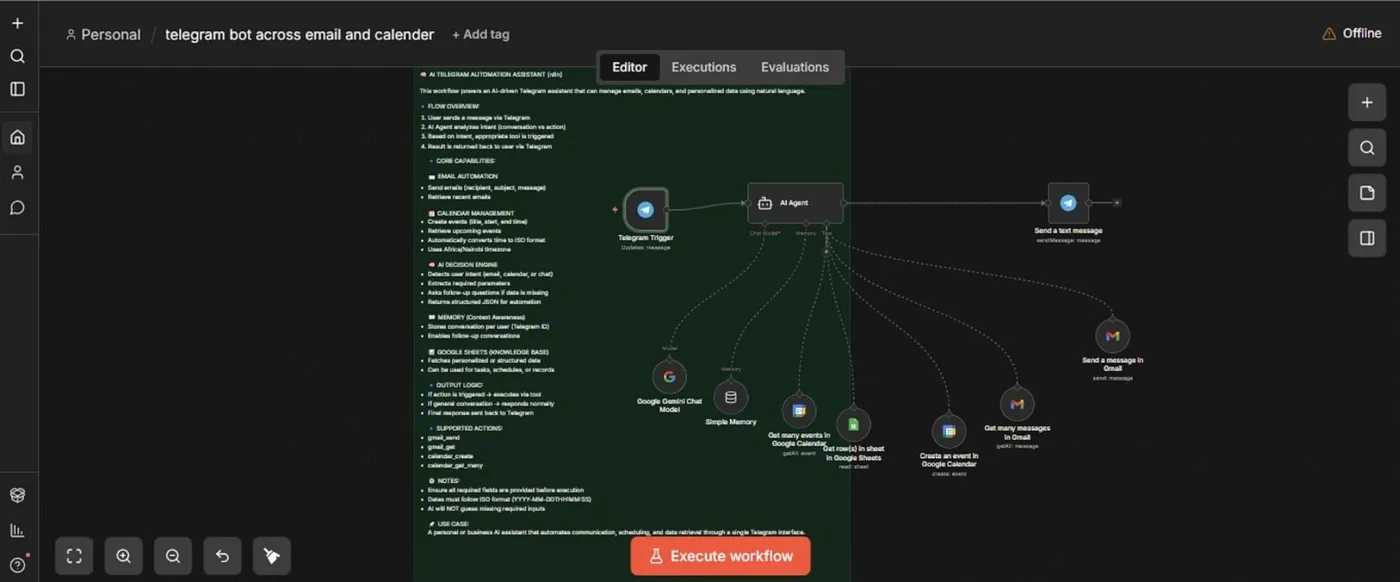
In this guide, we will create a Telegram-based AI assistant capable of:
Reading, deleting, and organizing emails
Scheduling meetings and setting reminders
Responding to voice commands
Analyzing images
Accessing a personalized knowledge base (e.g., Google Sheets)
Making intelligent decisions using AI
This assistant acts as a centralized digital worker, helping streamline business and personal productivity tasks.
Tools and Technologies
To build this system, we will use:
n8n — A no-code/low-code automation platform
Telegram Bot — For user interaction
OpenAI API — For AI-powered responses and decision-making
Email Node (IMAP/SMTP) — To manage inbox operations
Google Sheets API — For storing and retrieving structured data
Calendar Integration — For scheduling and reminders
These tools work together to create a flexible and scalable automation.
Core Features of the AI Assistant
1. Email Management
The assistant can:
Check incoming emails
Notify you of new messages
Delete unwanted email
Flag spam automatically
This is achieved using n8n’s email nodes connected to your inbox.
2. Calendar and Scheduling
By integrating calendar APIs, the assistant can:
Book meetings
Set reminders
Check availability
This eliminates the need for manual scheduling.
3. AI Decision-Making
Using AI, the system can:
Interpret user commands
Decide what action to take
Generate intelligent responses
For example, a message like “Schedule a meeting tomorrow at 10 AM” is automatically processed and executed.
4. Voice Interaction
The assistant can:
Accept voice messages
Convert speech to text
Respond with voice output
This makes the system more natural and user-friendly.
5. Image Analysis
Users can send images, and the assistant can:
Analyze the content
Provide descriptions or insights
This is useful for tasks like document review or quick visual interpretation.
6. Knowledge Base Integration
By connecting to Google Sheets, the assistant can:
Retrieve stored data (e.g., schedules, tasks, meal plans)
Provide personalized responses
This transforms it into a context-aware assistant.
A Simple Step-by-Step Workflow Overview with No Coding Required
Step 1:
Create a Telegram Bot. Use Telegram BotFather (opens in a new tab) to generate a bot token, which will allow communication between users and your workflow.
Step 2:
Set Up n8n (opens in a new tab).
Install n8n locally or deploy it using cloud platforms.
Create a new workflow and connect your Telegram bot using the Telegram Trigger node.
Step 3:
Process User Input.
When a message is received:
Extract the text, voice, or image
Route it through the appropriate processing path
Step 4:
Integrate AI Send the input to an AI API to:
Understand the request
Generate a response or action
Step 5:
Connect Services Based on the AI’s decision:
Trigger email actions
Update calendar events
Fetch or store data in Google Sheets
Step 6:
Return Response.
Send the output back to the user via Telegram, either as text or voice.
Real-World Business Use Cases
This AI assistant can be applied in various scenarios:
Entrepreneurs: Manage emails, meetings, and reminders automatically
Customer Support: Handle basic queries and route complex ones
Personal Productivity: Act as a smart daily assistant
Small Businesses: Automate operations without hiring additional staff
Benefits of This Approach
No-code friendly: Minimal programming required
Scalable: Easily extend features as needed
Cost-effective: Reduces reliance on manual labor
Customizable: Tailored to specific business needs
So what does this mean for the future of businesses?
AI automation is no longer limited to large tech companies. With tools like n8n and AI APIs, anyone can build powerful, intelligent systems that handle real-world tasks efficiently. By creating a Telegram-based AI assistant, businesses can centralize operations, reduce repetitive work, and significantly improve productivity. As automation continues to evolve, solutions like this will become essential for staying competitive in a fast- paced digital world.
What’s Next?
Now that you’ve seen how to build an AI automation assistant, consider customizing it for your own workflow. You can extend this system with additional integrations, smarter AI logic, or even deploy it for team-wide use. The possibilities are endless — and this is just the beginning of what no-code AI automation can achieve.
Work smarter, not harder — let AI handle the rest.
Share this blog
Written by Benedict Owino
Benedict is a HRM student at Moi University with a growing focus on AI-powered automation and digital workflows. He builds practical solutions using tools like n8n, OpenAI, etc, combining business understanding with technology to solve real-world problems and a tech writer at Wecncode.
More from Benedict Owino